


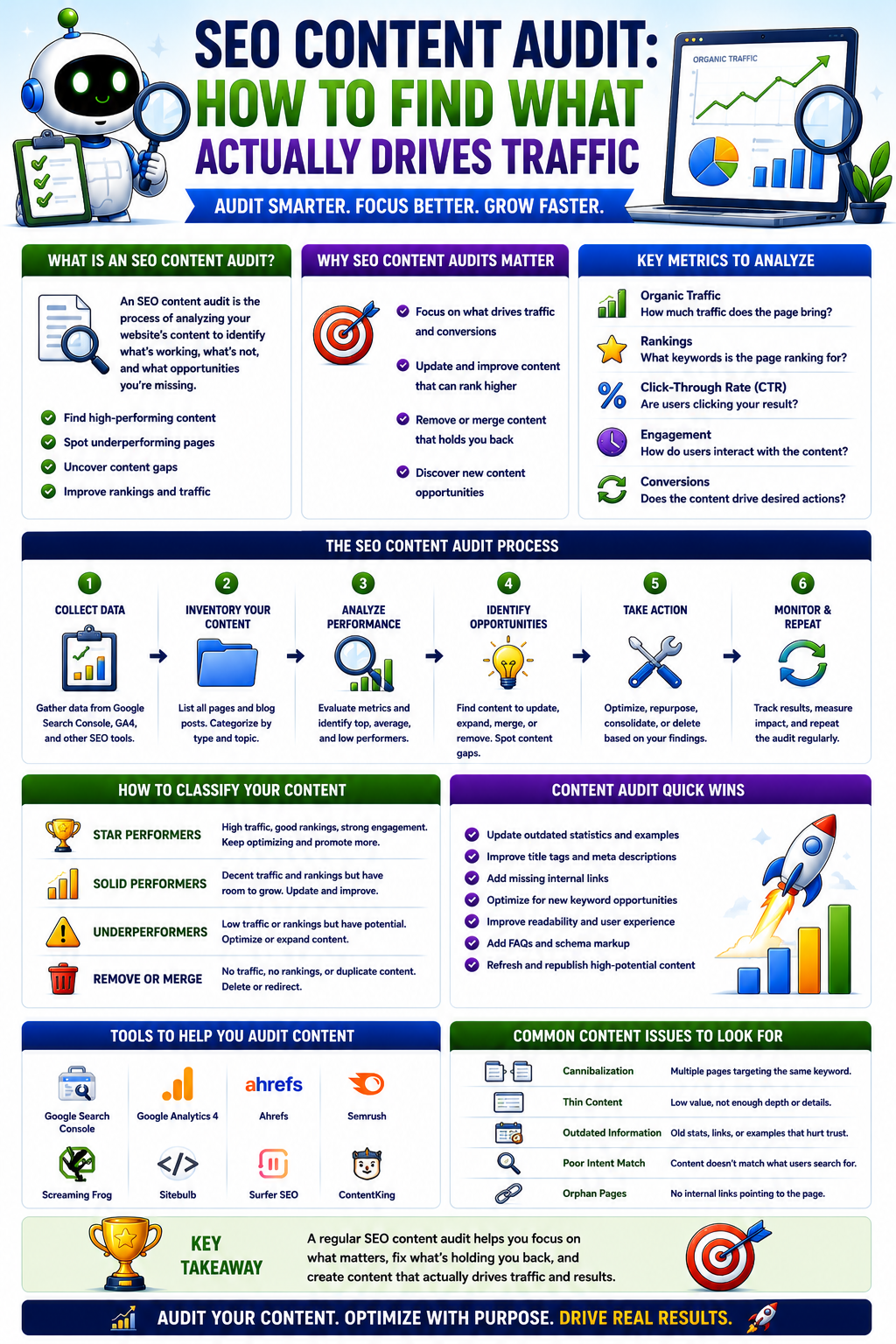
Most content teams face a cyclical, frustrating problem: they keep publishing new content without ever truly knowing whether their existing library is pulling its weight. A content library that has been growing organically for two or three years without regular auditing almost certainly contains a small handful of pages responsible for a large majority of organic traffic, a much larger number of pages generating almost nothing, and a subset of pages actively competing with each other for the exact same keywords. The gap between what the team thinks is performing and what is actually driving business results is frequently massive.
To bridge this gap, you must internalize a fundamental truth: a content audit is not a content inventory. Listing every page you have ever published alongside its word count and publication date is not an audit—it is bookkeeping. An SEO content audit is the process of systematically evaluating your existing content against traffic, ranking, and conversion data to determine what specific, data-backed action each piece of content warrants. This guide will walk you through a practical, sequential process for doing exactly that—including the data sources you need, a clear categorization framework, and the prioritization logic required to turn data into execution.
What a Content Audit Actually Is — and What It Isn’t
Distinguishing between an inventory and an SEO content audit is the difference between static data and strategic action. While an inventory catalogs what exists, an audit evaluates performance to dictate business decisions.
The specific goals of an SEO content audit are:
-
Identifying which content drives meaningful organic traffic and conversions.
-
Surfacing content that has ranking potential that is not currently being realized.
-
Spotting instances of keyword cannibalization where pages dilute each other’s authority.
-
Isolating thin, outdated, or useless content that should be consolidated or removed to improve the site’s overall quality signal.
A content audit is not a one-time project to complete and forget; it is a recurring process. Its frequency depends heavily on your publishing volume. A site publishing multiple pieces of content per week benefits from a quarterly audit of its top and bottom performers. A smaller site publishing monthly can typically manage a full audit annually, supplemented by a lighter review every six months.
What Data Do You Need Before You Start?
Before beginning any analysis, you must assemble your data into a single view. One row per URL, with columns tracking the metrics from the following key sources.
Google Search Console
This is the bedrock of any search-focused audit. Export performance data at the page level for the full available date range (typically 16 months to account for seasonality). Your key metrics are total clicks, total impressions, average position, and click-through rate (CTR). This data reveals which pages have search presence, which are visible but ignored, and which are completely invisible.
Google Analytics 4
GA4 provides the conversion and engagement context that search data lacks. Track organic sessions, engagement rate, and conversions or goal completions per landing page. This adds a critical business-impact layer; a page can receive thousands of clicks, but if it generates zero conversions or meaningful engagement, its current format is failing.
Third-Party SEO Tool Data
Tools like Ahrefs or SEMrush provide keyword ranking insights beyond Search Console, showing lateral keywords you might not have intentionally targeted. They are also invaluable for identifying pages sitting on page two or three of search results—a clear signal of unrealized potential that Search Console metrics alone might not flag cleanly.
Your CMS or Content Management Data
Pull the publication date, last updated date, author, category, and word count. These fields provide necessary context. A zero-traffic page published five years ago requires a fundamentally different operational decision than a zero-traffic page published five weeks ago.
The Audit Process — Step by Step
Once your spreadsheet is assembled, avoid the temptation to jump around. Follow this systematic, six-step process sequentially.
Step 1 — Establish Your Traffic Threshold
Before categorizing pages, establish a hard, objective minimum traffic threshold that separates “meaningful presence” from “effectively invisible.” This threshold varies by site size, but a practical baseline for mid-size sites is: if a page has received fewer than 20 organic clicks over the past 12 months and ranks below position 20 for any primary keyword, it is a candidate for action. Set this threshold before analyzing data; changing criteria mid-audit leads to inconsistent decisions.
Step 2 — Segment Content into Performance Tiers
Using your threshold, sort your full URL list into three initial groups: top performers (high traffic/conversions), underperformers with potential (moderate impressions but low clicks or stuck on page two), and dormant pages (effectively zero search presence). This segmentation simplifies the decision-making process for the next steps.
Step 3 — Analyze the Top Performers
For pages driving stable or growing traffic, your goal is replication, not overhaul. Ask: What made these pages work? Analyze their keyword clusters, content depth, internal linking structures, and conversion paths. If a top-performing page shows a downward traffic trend over the last quarter, it immediately becomes a high-priority target for an update.
Step 4 — Identify Underperformers with Real Potential
The most lucrative category in a content audit consists of pages sitting in positions 11 through 30 for keywords with genuine search volume. Google already recognizes these pages as relevant; they just lack the depth or authority to break into the top tier. The distance between position 14 and position 4 is the difference between negligible traffic and a steady stream of leads. Targeted updates here offer a much higher ROI than writing new content from scratch.
Step 5 — Identify Cannibalization
Look for clusters of URLs appearing for identical or heavily overlapping queries. Two of your pages ranking at positions 9 and 12 for the same high-value keyword are not twice as good; they are splitting ranking signals. Consolidating them into a single, comprehensive page often concentrates authority enough to push that single URL into the top five.
Step 6 — Categorize Content for Action
Assign every audited URL one of four definitive action labels based on your findings: Keep and Reinforce, Update, Consolidate, or Remove or Noindex.
What to Do with Each Content Category
| Content Category | Selection Criteria | Operational & Technical Steps |
| Keep and Reinforce | High, stable traffic and healthy conversion rates. | Protect positions; strengthen internal links; expand into adjacent low-volume keywords. |
| Update | Declining top performers OR pages stuck on pages 2–3 of SERPs. | Conduct competitive analysis; close substantive information gaps; refresh outdated data. |
| Consolidate | Multiple URLs competing for the same search intent. | Merge text onto the stronger URL; implement 301 redirects from the deprecated URLs. |
| Remove or Noindex | Zero traffic over 12 months, thin content, no backlinks. | Delete and return 404/410 OR add noindex tag if the page serves a non-search user purpose. |
Keep and Reinforce
The priority for Keep and Reinforce pages is protection and enhancement. Do not overhaul the copy. Instead, strengthen internal linking to these URLs from newer, related blog posts using descriptive anchor text. Ensure they are correctly mapped in your XML sitemap. If traffic is stable but flat, identify adjacent, long-tail keyword opportunities the page can naturally cover without diluting its core focus.
Update
Content updates must be substantive, not cosmetic. Refreshing a publication date or tweaking an introductory paragraph rarely sways search algorithms. For every page marked Update, analyze the competing pages currently outranking you. Identify specific structural gaps: missing subtopics, unanswered user questions, lack of original data, or outdated examples. Your update must systematically close those informational gaps.
Consolidate
When executing a Consolidate strategy, identify the URL with the stronger existing backlink profile and ranking history to serve as the master destination. Merge the unique, high-quality portions of the weaker page into this master page. Crucially, implement a permanent 301 redirect from the old URL to the new one, and update all internal links across your site to point to the master URL. Skipping the 301 redirect means Google will continue to view both pages, destroying the consolidation benefit.
Remove or Noindex
Pages assigned to Remove or Noindex require a technical health check. Before deleting a page, check its backlink profile using your SEO tool. If a zero-traffic page possesses valuable external backlinks, do not delete it blindly; instead, 301 redirect it to the most relevant live page to preserve that link equity. If it has no backlinks and no traffic, it can be deleted safely (returning a 404 or 410 server code). If the page is necessary for internal navigation or customer reference but holds no SEO value, apply a noindex tag instead of deleting it.
How to Prioritize What to Act On First
The most common point of failure for an audit is attempting to execute all recommendations simultaneously. A library of several hundred pages can easily yield dozens of update and consolidation tasks.
To maintain momentum, prioritize your workload in this exact order:
-
Declining Top Performers: These pages are currently keeping your organic engine running but losing power. Fixing them protects your existing traffic and lead volume.
-
Page-Two Underperformers: These represent your quickest wins. The ranking foundation is already built; targeted optimization can yield massive traffic spikes with minimal effort.
-
High-Value Cannibalization Clusters: Merging pages that compete for commercial or high-intent keywords eliminates internal friction and pushes your primary URLs into profitable visibility.
-
Low-Value Content Clean-up: Deleting or noindexing thin, irrelevant pages improves your site’s overall quality score over time, but it should be treated as a background hygiene task rather than an immediate priority.
How Often Should You Run a Content Audit?
Align your audit cadence with your content production velocity and business rhythm:
-
High-Volume Publishers: If you publish multiple pieces of content per week, your site accumulates data quickly. Conduct a comprehensive content audit every six months, backed by monthly performance checks on your top 50 pages.
-
Low-to-Moderate Publishers: If you publish a few times a month, run a full content audit annually, with a lighter quarterly review focused on identifying sudden performance drops or emerging cannibalization.
Treat your audits as a core component of your ongoing editorial planning cycle rather than an emergency response to a sudden drop in rankings. The most successful marketing organizations use audit data to dictate their future content calendar, balancing new asset creation with existing asset optimization.
Common Content Audit Mistakes to Avoid
-
Treating the audit as a one-time report: A spreadsheet that yields no operational changes is a waste of time. An audit is an ongoing optimization program, not a static document.
-
Updating without clear intent: Refreshing text without identifying specific informational or structural gaps compared to top-ranking competitors produces zero ranking movement.
-
Blind deletion: Deleting underperforming pages without checking for external link equity or internal links breaks user experiences and drops site authority.
-
Failing to execute redirects: Merging content during consolidation without setting up permanent 301 redirects leaves dead ends for users and deprives the master page of historical authority.
-
Relying solely on traffic metrics: Overlooking conversion data can cause you to accidentally delete or alter low-traffic pages that are silently driving highly qualified, high-value sales conversations.
-
Auditing without hard thresholds: Relying on vague, subjective feelings like “this page feels old” instead of clear click and position benchmarks leads to inconsistent, unrepeatable choices.
Conclusion and Next Steps
An SEO content audit is a systematic methodology for aligning your existing assets with actual data to uncover what drives results, what possesses hidden potential, and what is diluting your search performance. Done correctly, optimizing your existing content library yields a much higher and faster return on investment than endlessly creating new content to fill gaps your current pages could easily cover.
Do not let the scale of the task paralyze you. Start by downloading your last 12 months of page-level data from Google Search Console, sort it by clicks, and observe the distribution. This single spreadsheet will instantly reveal the reality of your content performance and give you the foundational input needed to execute the framework outlined in this guide.
If your library is extensive or you lack the internal resources to process this data systematically, our team specializes in diagnostic analysis and tailored growth plans. Contact us today for a free SEO content audit assessment to gain complete clarity on what your content library is actually doing for your organic performance.