


Ask three SEO consultants why a site has indexing problems, and at least one of them will say “crawl budget” within the first five minutes. It’s become the default technical explanation for almost anything — slow indexing, missing pages, stagnant rankings — regardless of whether the site in question has 500 pages or 5 million.
Here’s the honest answer most agencies won’t lead with: most websites do not need to actively optimize crawl budget. Google’s own guidance on the topic says so plainly. But a specific, identifiable category of large, complex, frequently changing sites genuinely does have a crawl budget problem worth solving.
This guide draws that line clearly. You’ll get an accurate definition of crawl budget, an honest explanation of why the term gets overused, a direct four-step test to find out whether it applies to your site, and — if it does — exactly what to fix first.
What Is Crawl Budget, Exactly?
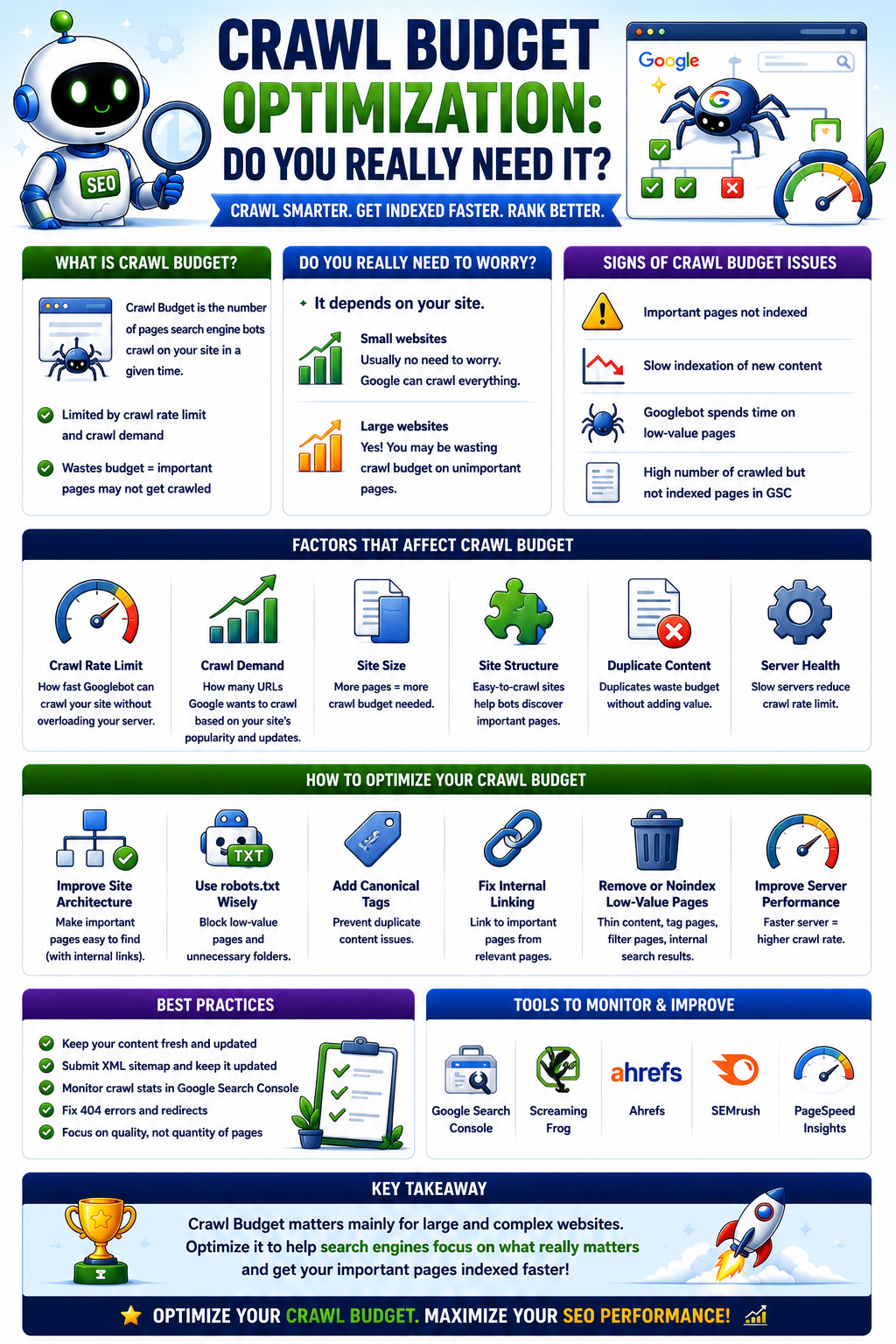
Crawl budget is the combination of two factors Google uses to decide how many URLs on a site it will crawl, and how often.
Crawl rate limit is how fast Googlebot can crawl a site without overloading its server — determined by how healthy and responsive the server is, plus any explicit limits a site owner sets in Search Console. Crawl demand is how much Google actually wants to crawl the site in the first place, based on how valuable, fresh, and popular its URLs appear to be.
Here’s the relationship that matters most: crawling is a prerequisite for indexing, and indexing is a prerequisite for ranking — but crawl budget itself is not a ranking factor. A page Google crawls less frequently isn’t penalized for it. It may simply take longer for changes to show up in the index, or, on very large sites, it may not get crawled and indexed at all if it’s competing for attention against hundreds of thousands of other URLs.
Crawl budget is a meaningful concern primarily for sites with many thousands of URLs or more — not for the average business website, blog, or small online store. If that describes your site, the rest of this article matters less to you than the section below on where to actually spend your time instead.
Why This Topic Gets Exaggerated
There’s a simple reason crawl budget gets invoked so often, even when it has nothing to do with the actual problem: it sounds like a sophisticated technical diagnosis. “Crawl budget” is a satisfying explanation. “Your content isn’t good enough yet” or “your internal linking buries your most important pages” are less flattering — but they’re the real answer far more often.
It also gets confused with a related but genuinely different concept: indexing. A page can be perfectly crawlable, get crawled without any trouble, and still not make it into the index — because Google’s systems judge it as low-value, duplicate, or simply not worth including. That’s a quality judgment, not a crawling capacity constraint, and the fix has nothing to do with crawl budget at all.
This distinction shows up clearly in Search Console’s own labeling. “Discovered – currently not indexed” means Google knows a URL exists but hasn’t gotten around to crawling it — a genuine signal related to crawl prioritization. “Crawled – currently not indexed” means something different and more common: Google crawled the page, evaluated it, and decided it didn’t meet the bar for inclusion in the index. The first is sometimes a crawl budget issue. The second almost never is — it’s a content or quality issue wearing a technical-sounding label.
Does Your Site Actually Have a Crawl Budget Problem? A Direct Test
This is the part of the article worth bookmarking. Run through these four steps before spending a single hour or dollar on crawl optimization work.
Step 1 — Check Your Site’s Scale
Crawl budget is a realistic concern primarily for sites in roughly the tens of thousands of URLs or more, particularly ones that change frequently: large e-commerce catalogs, classifieds platforms, large publishers, or any site with faceted navigation generating large numbers of parameter-based URLs. If your site has a few hundred or a few thousand reasonably well-structured pages, crawl budget is very unlikely to be your constraint — no matter what a report claims.
Step 2 — Check Google Search Console’s Crawl Stats Report
Open the Crawl Stats report under Settings and look at total crawl requests over time, average server response time, and the breakdown of crawl purpose and response codes. The clearest evidence of a real problem is a high proportion of crawl requests hitting low-value URLs — faceted navigation parameters, redirect chains, duplicate pages, soft 404s — combined with a flat or declining crawl trend on the pages that actually matter to your business.
Step 3 — Compare Crawled vs. Indexed Pages
In the Pages report under Indexing, check how many known pages fall under “Discovered – currently not indexed” versus “Crawled – currently not indexed.” A large volume in the first category points to a genuine crawl prioritization issue — Google knows the pages exist but isn’t getting to them. A large volume in the second category points to a content or quality problem that crawl budget work won’t fix, no matter how much engineering time goes into it.
Step 4 — Check Server Log Files for Crawl Patterns
If you have access to raw server logs, this is the most definitive method available. Look at how much Googlebot activity is hitting low-value URL patterns — internal search results, session IDs, tracking parameters, deep paginated archives — compared to the high-value pages your business actually wants ranking. A significant share of crawl activity going to low-value patterns, paired with infrequent crawling of important pages, is concrete evidence that crawl budget is being spent inefficiently.
If your site fails Step 1, the rest of this guide isn’t a priority for you right now — skip ahead to the section on where your time is better spent. If it passes Step 1 and shows the patterns described in Steps 2 through 4, crawl budget optimization is a legitimate, worthwhile investment.
What Actually Wastes Crawl Budget — And How to Fix It
For sites that genuinely qualify, here are the most common causes, each with a practical fix.
Faceted Navigation and Parameter-Based URLs
E-commerce and large content sites with filtering by color, size, price, or category combinations can generate enormous numbers of near-duplicate URLs from a small set of underlying pages. Fix: block parameter patterns that don’t need crawling through robots.txt, implement canonical tags pointing to the primary version of each page, and configure URL parameter handling appropriately for your platform.
Duplicate Content and Redirect Chains
Multiple URLs serving identical or near-identical content — with and without trailing slashes, http versus https inconsistencies, www versus non-www variants — force Google to crawl and evaluate redundant pages. Redirect chains, where one redirect leads to another rather than straight to the final destination, waste crawl requests on intermediate hops. Fix: consolidate to a single canonical version of each URL, update internal links to point directly at final destination URLs, and collapse redirect chains into single-hop redirects.
Low-Value Pages Generated at Scale
Internal search result pages, thin tag archives, auto-generated pages with little unique value, and excessive pagination can all consume crawl budget without adding meaningful value to the index. Fix: noindex or block low-value page types that don’t need to appear in search results, and consolidate thin paginated archives wherever possible.
Slow Server Response Times
Crawl rate limit is directly tied to server health. A slow or frequently erroring server causes Google to crawl more conservatively to avoid making things worse. Fix: address core server performance, reduce time-to-first-byte, and confirm the server can handle Googlebot’s crawl rate without degrading for real visitors.
Weak Internal Linking to Important Pages
Pages buried deep in a site’s structure, reachable only through many clicks from the homepage, signal lower importance to Google’s crawling systems regardless of how valuable they actually are to the business. Fix: strengthen internal linking from high-authority, frequently crawled pages to the pages that matter most, and keep critical pages reachable within a few clicks of the homepage.
XML Sitemap Issues
A bloated sitemap that includes low-value, non-canonical, or noindexed URLs dilutes the signal a sitemap is meant to send about which pages genuinely matter. Fix: keep sitemaps limited to canonical, indexable, high-value URLs, and keep them current as the site evolves.
What to Do Instead If Crawl Budget Isn’t Your Problem
If your site failed Step 1, your indexing or visibility issues are far more likely caused by one of these — and each one delivers more improvement per hour invested than crawl budget work ever would for a site this size:
- Content quality and depth — pages that don’t comprehensively answer the query they’re meant to rank for
- Weak internal linking — important pages not well-connected to the rest of the site’s structure, entirely independent of crawl considerations
- Insufficient backlinks or domain authority — newer or smaller sites simply haven’t earned enough trust signals yet for some pages to get prioritized
- Technical indexability issues unrelated to crawl volume — an accidental noindex tag, a robots.txt block, or a canonical tag pointing somewhere else entirely
For the large majority of businesses, these four areas are where the real return on effort lives.
Monitoring Crawl Health Going Forward
If you do qualify for crawl budget work, or simply want appropriate ongoing visibility, a lightweight habit beats a one-time audit:
- Review the Crawl Stats report monthly, watching for sudden spikes in requests to error pages or unexplained drops in crawl activity on key sections
- Spot-check server logs quarterly if you have access, especially after major site or platform changes
- Re-run the four-step test from this guide after any major migration, replatforming, or significant URL structure change — these are the moments most likely to introduce new crawl inefficiencies
Conclusion and Next Steps
Crawl budget optimization is a real, legitimate technical SEO discipline — but it applies to a specific, identifiable category of large, complex, frequently changing sites, not to every business with a website. For most readers, the four-step test in this guide will show that crawl budget isn’t what’s holding their site back, and that their time is better spent on content quality, internal linking, or authority building.
Run the test before investing further time or budget into crawl optimization, regardless of what you’ve been told. The honest answer protects your resources either way — confirming a real problem worth fixing, or redirecting your effort to where it will actually move the needle.
Not sure if crawl budget is actually your problem — or just what an agency told you to worry about? Contact our team for a free technical crawl audit and get a straight answer, backed by your own Search Console and server log data.