


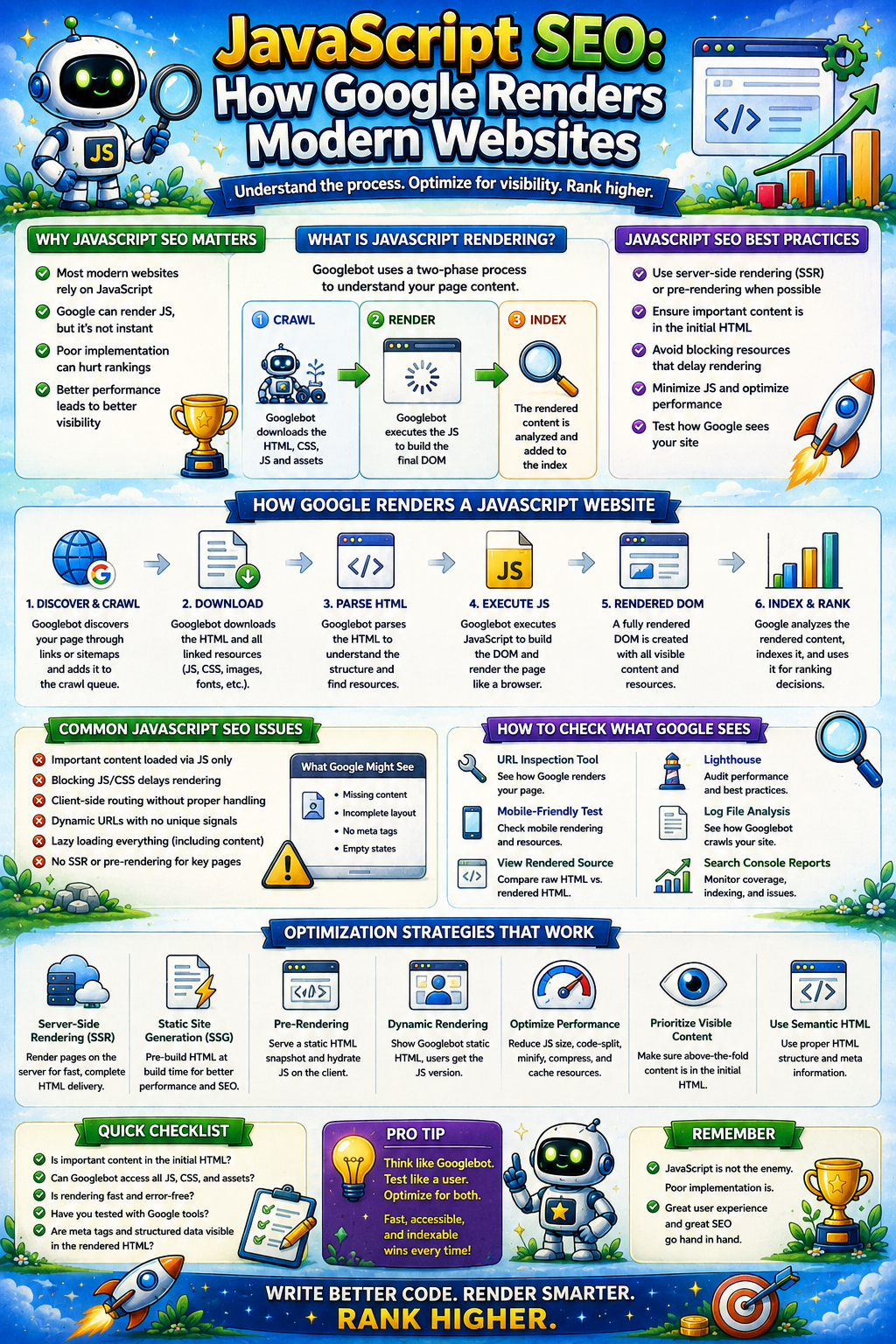
In the early days of search, SEO was simple: Googlebot would fetch your HTML, read the text, and rank you. But the web has evolved. Today, modern websites are no longer static documents; they are complex software applications built on JavaScript (JS) frameworks like React, Next.js, Angular, and Vue.
For businesses, this shift to JS-heavy architecture is a double-edged sword. While it offers unparalleled user experience and speed, it introduces a massive layer of complexity for search engines. If your JavaScript is poorly implemented, Googlebot might see a blank page where your million-dollar product catalog should be.
This is the definitive guide to JavaScript SEO. We will explore the mechanics of how Google renders the modern web, the pitfalls of various rendering strategies, and how to ensure your site isn’t just visible to users, but indexable by the world’s most powerful crawlers.
1. The Three Stages of the Googlebot Journey
To master JS SEO, you must first understand that Google does not index your site in a single pass. In 2026, Googlebot operates through a sophisticated, multi-stage pipeline designed to manage the immense computational cost of execution.
Stage 1: Crawling & The Initial Fetch
When Googlebot hits your server, it first retrieves the initial HTML file. In a traditional site, this file contains all your content. In a Client-Side Rendered (CSR) site, this file is often a “skeleton”—a few lines of code and a script tag.
- The Problem: If your content isn’t in that initial HTML, Google moves to Stage 2, which introduces a delay known as the “Rendering Gap.”
Stage 2: The Render Queue (The Second Wave)
Googlebot doesn’t execute JavaScript immediately. Because rendering requires significant CPU resources (think of it as opening thousands of browser tabs simultaneously), your page is placed in a Render Queue.
- The Wait: Depending on your site’s authority and server speed, the delay between crawling and rendering can range from minutes to days. If your content is time-sensitive (news, stock prices, or seasonal e-commerce), this gap can be a silent killer of your organic traffic.
Stage 3: Indexing the Rendered DOM
Once the resources are available, a service called the Web Rendering Service (WRS)—powered by a “Headless” version of Chromium—executes your JS. It generates the Document Object Model (DOM). This final version of the page is what Google actually uses to rank your site.
2. Rendering Strategies: Choosing the Right Path for ROI
Choosing your rendering architecture is the most important technical decision you will make. In the US market, where competition for the “Zero-Click” snippet is fierce, your choice determines your search survival.
Client-Side Rendering (CSR) — Proceed with Caution
In CSR, the user’s browser (or Googlebot) does all the heavy lifting. The server sends a nearly empty page, and the JS builds the site on the fly.
- Verdict: Risky. CSR is prone to “partial indexing” where Googlebot times out before the content loads, leading to broken rankings.
Server-Side Rendering (SSR) — The Gold Standard
With SSR, your server executes the JS and sends a fully-formed HTML page to the crawler.
- Verdict: Highly Recommended. It eliminates the “Rendering Gap” because Googlebot sees the content immediately upon the first fetch.
Static Site Generation (SSG) & ISR
Popularized by frameworks like Next.js, SSG pre-renders pages at build time. Incremental Static Regeneration (ISR) allows you to update static pages without rebuilding the entire site.
- Verdict: The Future. It combines the speed of static files with the flexibility of a database-driven site.
3. Technical Pitfalls: Why Google Might Miss Your Content
Even with a great framework, small coding errors can lead to massive indexing failures.
The 5-Second Timeout
Googlebot is patient, but not infinite. If your JavaScript takes more than 5 seconds to fetch data and render the main content, Googlebot may give up and index the “loading” state.
- Fix: Optimize your API response times and use Critical CSS to ensure the page looks “ready” instantly.
The “OnClick” Navigation Trap
Googlebot is a crawler, not a user. It doesn’t “click” buttons. If your site uses JavaScript onclick events for navigation instead of standard <a href> tags, Googlebot will never find your internal pages.
- Strict Rule: Always use semantic HTML for links.
The Hydration Nightmare
In modern frameworks, “Hydration” is the process where static HTML becomes a reactive JS app. If there is a mismatch between the server-rendered HTML and the client-rendered JS, the page may “flicker” or become unresponsive (increasing your Total Blocking Time), which Google interprets as a poor user experience.
4. Performance & Core Web Vitals (The 2026 King: INP)
In 2026, Google’s focus has shifted from mere loading speed to Interaction.
Interaction to Next Paint (INP)
INP measures how fast your site responds to a user’s first action (like a click). Heavy JavaScript bundles are the primary cause of poor INP. If your JS is busy executing a massive library, it can’t respond to the user, leading to a “frozen” feeling.
Reducing Main Thread Work
Every millisecond the browser spends parsing your JS is a millisecond it isn’t rendering. To win at JS SEO, you must:
- Minify and Compress: Use Brotli or Gzip.
- Code Splitting: Only load the JS needed for the specific page the user is on.
- Defer Non-Critical JS: Don’t let your “Live Chat” widget block your “Buy Now” button.
5. Advanced Diagnostics: How to Audit Your JS SEO
If you suspect your JavaScript is hurting your rankings, you need to look at your site through Google’s eyes.
- The URL Inspection Tool: Use the “Test Live URL” feature in Google Search Console. View the “Tested Page” -> “Screenshot” and “HTML” tabs. If the screenshot is blank or the HTML is missing your text, you have a rendering problem.
- Compare “View Source” vs. “Inspect Element”: If the content you want to rank for is in “Inspect” but not in “View Source,” you are relying entirely on the Render Queue.
- Log Analysis: Look for Googlebot-Render in your server logs. This tells you how often Google is actually bothering to render your JS.
6. The Rise of GEO: Generative Engine Optimization
As we move deeper into 2026, we are seeing the rise of GEO. AI models like Gemini and SearchGPT don’t just “crawl” the web; they “ingest” it.
AI models are even more sensitive to JS rendering issues than traditional search engines. They require clean, structured data and fast-loading HTML to build their knowledge graphs. If your site is a tangled mess of slow-executing JavaScript, you will be excluded from the AI-generated overviews that are now dominating the top of the search results.
Conclusion: Don’t Let Code Hide Your Content
JavaScript is the foundation of the modern, interactive web, but it shouldn’t be a barrier to your organic growth. Success in JavaScript SEO requires a bridge between your development team and your marketing strategy.
You need a site that is as fast as it is functional—one that serves the user while feeding the crawler exactly what it needs to see.
Is your JavaScript framework hiding your content from Google? At SeoProsecco, we specialize in the high-level technical audits required to fix rendering bottlenecks and unlock your site’s true potential.
[Contact us for a Technical SEO Consultation and make your JS work for you, not against you. 🍷]